
Best App for Sales Rep: 19 Top Tools
Best App for Sales Rep: 19 Top Tools
Choosing the best app for your sales reps can feel like choosing a CRM all over again, a crowded market, overlapping features, and lots of buzzwords.
But at the end of the day, reps need tools that help them prospect, follow up, run meetings, and close deals without drowning in admin.
In this guide, we’ll walk through what makes a great sales app, compare a few top platforms side-by-side, and then review 19 of the best apps for sales reps.
Quick Comparison: Best Apps for Sales Reps at a Glance
Platform | Key Strengths | Good fit for you… |
|---|---|---|
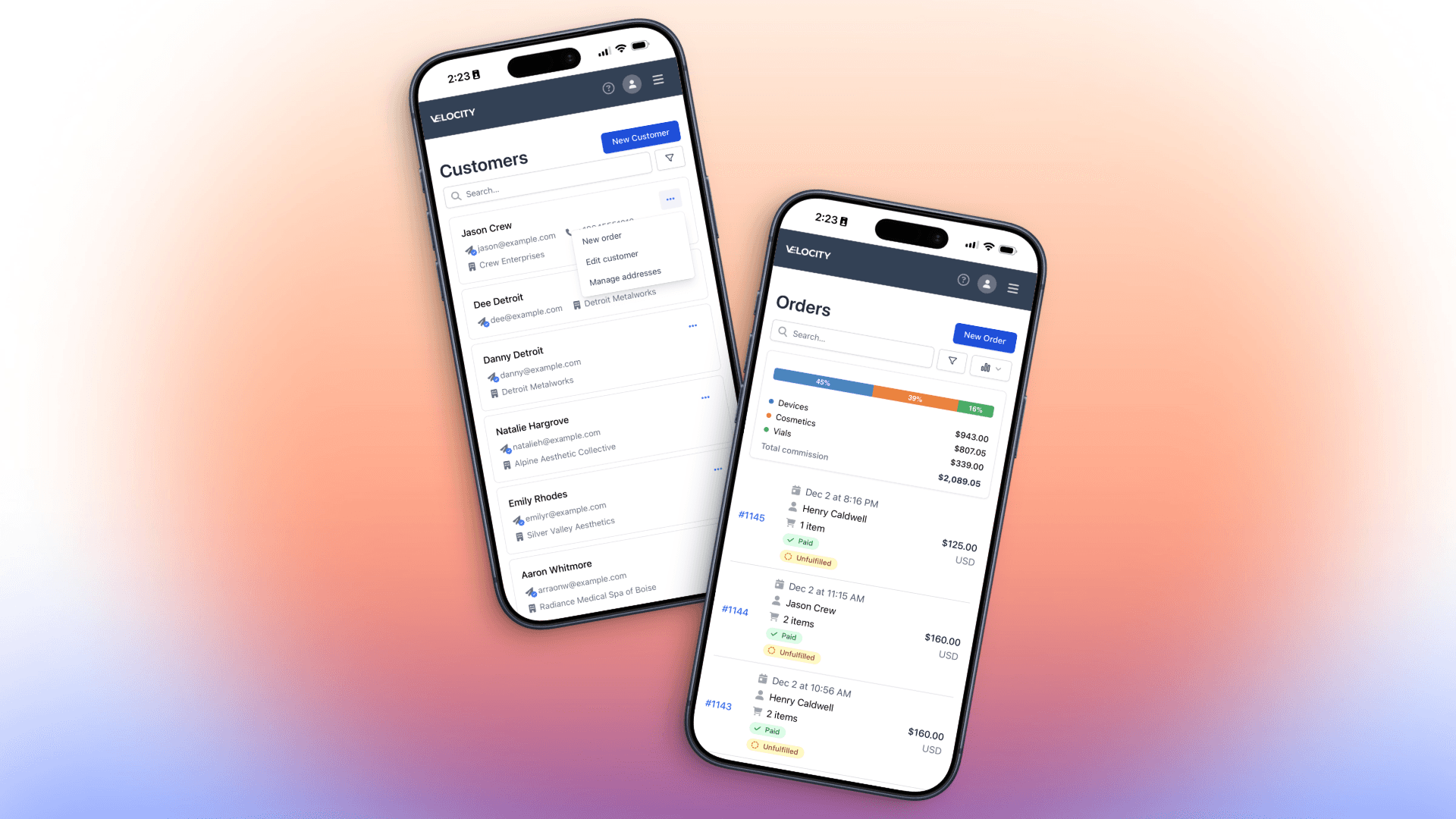
Velocity (MedShift) | Sales rep portal with mobile access; onboard new customers and place orders on the go; territories and account ownership; automated commission payouts; reps only see their own customers, orders, and commissions; tight e-commerce integration. | You manage B2B or hybrid e-commerce + reps, and need one place for reps to sell, track performance, and see their commissions. |
Zendesk Sell | Mobile-first CRM; deal and contact management; call, email, and SMS logging; clean pipeline view. | You want a simple, modern CRM that reps will actually use on their phones. |
HubSpot CRM (mobile) | Free CRM with solid mobile app; contact and deal history; tasks; calling; deep marketing integration. | You’re a growing team that wants a low-friction CRM with strong marketing + sales alignment. |
Zoho CRM | Affordable CRM suite; strong mobile app with offline access and check-ins; customizable automations. | You need a budget-friendly but flexible CRM that supports field and inside reps. |
SPOTIO | Purpose-built for field sales; territory mapping; routing; GPS tracking; canvassing tools. | Your revenue depends on outside reps visiting territories and you need to structure and track their activity. |
LinkedIn Sales Navigator | Social selling on the go; advanced lead search; account insights; InMail; CRM sync. | Your reps do B2B outbound on LinkedIn and need a focused tool to find and work the right accounts. |
What Makes a Great Sales App for Reps?
Before you pick a tool, it helps to define what “great” looks like from a rep’s point of view, not just management’s.
1. Mobile-first experience
Reps are in the field, in meetings, or on calls. They need a clean, fast app on iOS/Android that doesn’t feel like a shrunk desktop UI. Offline access is a big plus.
2. Helps reps sell, not just report
The app should make it easy to:
See who to contact today
Log calls, emails, and notes in seconds
Move deals through stages
Follow up at the right time
If it mainly serves reporting dashboards for managers, adoption will suffer.
3. Automation & AI where it matters
Great sales apps reduce busywork: auto-logging activities, suggesting next steps, sending reminders, or running sequences. The more “zero-admin” it feels, the better.
4. Field-friendly features (if you’re in the field)
For field sales reps, mapping, routing, nearby-lead suggestions, and check-ins can be transformative for productivity.
5. Clear pipeline and account visibility
Reps should instantly know: what’s in their pipeline, which deals are stuck, and which accounts need attention today.
6. Integrations with your stack
Email, calendar, marketing automation, e-commerce, VOIP, ERP. If the app doesn’t connect to your world, reps end up retyping data.
7. Permissions and data control
For rep-driven businesses, it’s critical that reps only see their accounts, orders, and commissions. This is where tools like Velocity stand out.
Top 19 Best Apps for Sales Reps
Below you’ll find a mix of core sales platforms (where reps live) and supporting apps that dramatically boost productivity. Use the combination that matches your motion.
1. Velocity – Best Overall for Rep-Driven & Hybrid B2B Teams
Key features
Dedicated sales rep portal reps can use any device to onboard customers and place orders in minutes.
Territory mapping and account ownership, so each rep sees only their own customers and orders.
Automated commissions, tying activity and orders directly to what each individual rep or group earns.
Deep integration with e-commerce, so reps and online sales can share the same backbone instead of competing systems.
Why choose it
If your business relies on sales reps, distributors, or a hybrid e-commerce + field sales model, Velocity lets you centralize how reps sell, track performance, and get paid. Instead of juggling a CRM, commission spreadsheets, and manual territory rules, reps get a single pane of glass to run their book of business.
2. Zendesk Sell – Best Mobile CRM for SMB Sales Teams
Key features
Contact, company, and deal management with customizable pipelines.
Built-in calling, email, and SMS logging so reps don’t have to switch apps.
Mobile app designed for reps on the go, with quick access to tasks and deals.
Why choose it
Zendesk Sell is great if you want a sales-first CRM that’s lighter than enterprise tools but still powerful enough for growing teams. Reps get clarity on their pipeline without feeling overwhelmed.
3. HubSpot CRM (Mobile App)
Key features
Free core CRM: contacts, companies, deals, tasks, and activities.
Mobile app with timeline view of interactions, in-app calling, and quick note taking.
Tight integration with HubSpot’s marketing and service hubs.
Why choose it
Ideal for teams that want to start fast with zero license friction and later layer on marketing automation, content, and service, all on the same platform.
4. Zoho CRM
Key features
Full-featured CRM with customizable modules, automation, and analytics.
Mobile app with offline access, location-based check-ins, and notifications.
Large ecosystem of other Zoho apps (email, projects, finance, etc.).
Why choose it
If you’re cost-conscious but still want a flexible, customizable CRM for both inside and field reps, Zoho is a strong option.
5. SPOTIO – Best for Field and Door-to-Door Sales
Key features
Territory management and map-based views of leads and customers.
Route optimization and visit planning.
Activity tracking and reporting for field visits.
Why choose it
SPOTIO is purpose-built for outside and door-to-door sales. If your main question is “where should reps go today and what did they do there?”, this is a top contender.
6. LinkedIn Sales Navigator – Best for Social Selling
Key features
Advanced filters to find and save leads and accounts.
Real-time updates on job changes, company news, and mutual connections.
InMail for outreach and integrations with many CRMs.
Why choose it
For B2B reps who live on LinkedIn, Sales Navigator is still the go-to tool to find the right people and engage them with context.
7. Pipedrive
Key features
Visual, drag-and-drop pipelines that are very rep-friendly.
Email integration, activity reminders, and basic automation.
Simple configuration, easy to get started.
Why choose it
Best for small-to-mid-size sales teams that want a clean, visual CRM and don’t need deep enterprise complexity.
8. Salesforce Sales Cloud
Key features
Highly customizable CRM with advanced analytics, automation, and integrations.
Mobile app for accessing records, dashboards, and tasks on the go.
Large ecosystem of add-ons and partners.
Why choose it
Salesforce is still the default for large, complex sales organizations that need heavy customization and are willing to invest in admin and tooling around it.
9. Lindy – AI Assistant for Sales Teams
Key features
AI agents to automate repetitive tasks: follow-ups, data entry, CRM updates.
No-code workflow builder to design your own sales automation.
Works across tools you already use.
Why choose it
If your reps are spending too much time typing the same messages and updating systems, Lindy can act as a digital assistant to clear a lot of that busywork.
10. Badger Maps
Key features
Map-based view of accounts and prospects.
Route planning and optimization with traffic and time windows.
Check-ins and activity logs tied to locations.
Why choose it
If your reps drive a lot, Badger helps them see more customers per day by optimizing routes and surfacing nearby opportunities.
11. SalesRabbit
Key features
Canvassing tools for door-to-door teams.
Lead and area management with mapping.
In-field digital contracts and performance tracking.
Why choose it
Perfect for home services, solar, alarm systems, and other high-touch door-to-door sales models.
12. BeatRoute
Key features
Goal-based workflows and KPIs for field reps.
Tools for retail audits, merchandising, and promotions.
Mobile app tailored to CPG and FMCG environments.
Why choose it
If your reps visit physical stores to check stock, run promos, and report back, BeatRoute helps bring discipline and visibility to that execution.
13. LeadSquared
Key features
Lead capture and scoring across multiple channels.
CRM functionality with workflows and automation.
Support for field teams with check-ins and geolocation.
Why choose it
Better fit for businesses that need a blend of marketing automation + sales execution, especially in high-volume lead environments.
14. Dealfront (formerly Leadfeeder)
Key features
Identifies companies visiting your website, even if they don’t fill out forms.
Sends those leads to reps with firmographic data.
Integrates with CRMs and email tools.
Why choose it
Great for B2B teams that want reps to move quickly on warm website visitors instead of waiting for form fills.
15. Mailshake
Key features
Outbound email campaigns and sequences for sales prospecting.
Personalization, A/B testing, and deliverability-focused features.
Integrations with CRMs.
Why choose it
If your reps rely on cold email, Mailshake gives them structure and analytics instead of random manual outreach.
16. Vidyard
Key features
Simple screen and webcam recording.
Tracking on who watched your videos and for how long.
Integrations with email and CRM.
Why choose it
Perfect to stand out with personalized video outreach and to see who’s actually engaging with those videos.
17. ZoomInfo
Key features
Large B2B database with contact and company information.
Intent data and enrichment features.
Integrations with major CRMs and sales tools.
Why choose it
Your reps will spend less time hunting for contact data and more time actually reaching decision-makers.
18. Aircall
Key features
Cloud-based phone system with call routing.
Click-to-call inside your CRM.
Call recording and analytics.
Why choose it
If your sales playbook is call-heavy, Aircall gives you a modern, integrated call stack rather than a separate phone system.
19. Gong
Key features
Records and transcribes sales calls and meetings.
Analyzes conversations for coaching and deal risks.
Dashboards that show patterns across reps and teams.
Why choose it
Brilliant for managers who want to coach with real data, not just anecdotal feedback, and help reps improve faster.
How to Choose the Right Sales App for Your Team
With so many options, here’s a simple way to narrow the list.
1. Start with your sales motion
Mostly field/outside reps: SPOTIO, Badger Maps, SalesRabbit, BeatRoute.
Hybrid e-commerce + reps + commissions: Velocity shines here.
Inside/SDR teams: Zendesk Sell, HubSpot CRM, Pipedrive, Lindy.
Enterprise account-based: Salesforce, plus Sales Navigator, Gong, and a data provider like ZoomInfo.
2. Match the app to your biggest pain
Reps buried in admin: Lindy, Velocity (commissions + territories), Zendesk Sell automation.
No clear pipeline view: HubSpot, Pipedrive, Zoho, Zendesk Sell.
Chaos in territory coverage: Velocity’s territory and data scoping, SPOTIO, Badger Maps.
3. Consider budget and time to value
Need to start lean: HubSpot free, Zoho’s lower-tier plans, Pipedrive.
Ready to invest strategically: Velocity for rep-driven models, Salesforce for complex orgs, Gong or ZoomInfo as performance boosters.
4. Pilot with your real reps
Whatever you choose, roll it out with a small group of reps first. See what they actually use after two weeks; their behavior will tell you more than any feature matrix.
FAQs About Sales Rep Apps
What is the best app for sales reps overall?
It depends on your model, but for rep-driven, territory- and commission-heavy teams, Velocity stands out. For more general CRM needs, HubSpot, Zendesk Sell, or Pipedrive are strong options.
What’s the best app for field sales reps?
For outside and door-to-door sales, SPOTIO, Badger Maps, SalesRabbit, and BeatRoute are top choices. They focus on routing, territory coverage, and in-field productivity.
Do I need both a CRM and a sales app?
Sometimes one tool can do both (Velocity, HubSpot, Zoho, Zendesk Sell). Others like Sales Navigator, Lindy, Gong, or ZoomInfo work best as add-ons to your main CRM.
How much do sales rep apps cost?
Most use a per-user, per-month model, often with tiered features. Some offer free or low-cost entry plans, while enterprise CRMs and data tools can be a larger investment.
Which features matter most for mobile reps?
Prioritize offline access, fast loading, easy note-taking, and one-tap access to contacts and deals. For field teams, mapping, routing, and check-ins are especially important.
Final Thoughts
The “best app for sales reps” is the one your reps actually use every day, because it makes their job easier, not harder.
If you’re running a rep-driven, B2B, or hybrid e-commerce model, put Velocity at the top of your shortlist. It gives reps a dedicated portal to run their book of business, while giving leadership the territory control, commission accuracy, and visibility they need.
From there, layer in the right mix of CRM, field tools, AI assistants, and intelligence platforms to create a stack that supports how your team really sells, on the phone, in the field, on LinkedIn, and everywhere in between.