
Sales Orders: What They Are, How They Work & Why Automation Matters for B2B Teams

When orders pour in from field reps on the road, customers shopping your ecommerce store, and a customer service team keying in phone requests, things get complicated fast. Mismatched pricing, missed delivery dates, inventory that doesn’t add up. It all traces back to the same root cause: no single, standardized document governing what was actually sold.
That document is the sales order.
A sales order is a confirmation document created by the seller that captures every detail of a customer’s purchase: products, quantities, pricing, payment terms, and delivery expectations. It’s the bridge between a buyer saying “yes” and your team actually fulfilling the promise.
In this guide, we’ll break down what a sales order is, how it differs from purchase orders and invoices, walk through the step-by-step process, cover the most common types, and explore how automation can transform the way your B2B team manages orders. By the end, you’ll know exactly how a streamlined sales order process can accelerate your order-to-cash cycle and reduce costly errors.
INDEX
What Is a Sales Order?
Sales Order vs. Purchase Order: What’s the Difference?
Sales Order vs. Invoice
The Sales Order Process: Step by Step
Types of Sales Orders
Benefits of Sales Order Automation
What to Look for in Sales Order Management Software
FAQs
What does sales order mean?
What is the difference between a PO and a sales order?
What is sales order vs invoice?
Who gives the sales order?
What Is a Sales Order?
A sales order (SO) is a commercial document generated by a seller after a customer commits to purchasing goods or services. It serves as a formal confirmation of the transaction, detailing the product or service specifications, quantities, agreed-upon pricing, payment terms, and delivery information.
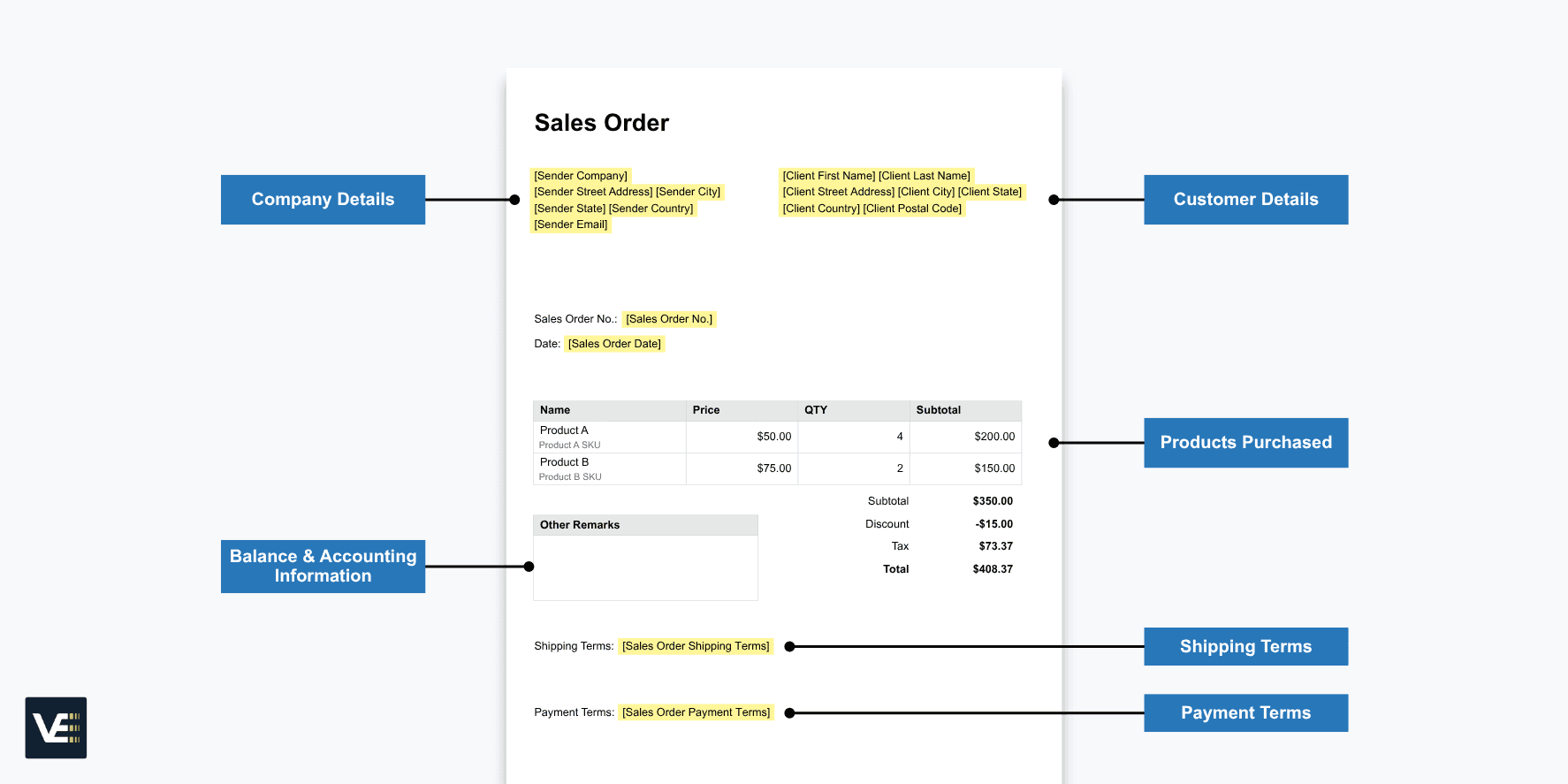
Unlike a contract, a sales order is primarily an internal document. It’s created by the seller’s team, typically a sales representative, customer service agent, or an automated system, to initiate and manage the fulfillment process. Once generated, the SO becomes the single source of truth that warehouses, finance departments, and logistics teams reference to pick, pack, ship, and invoice correctly.
So, when is a sales order created? It typically follows one of two triggers: the seller receives a purchase order (PO) from the buyer, or the customer agrees to purchase after reviewing a quote. Either way, the SO locks in the details and puts fulfillment into motion.
A standard sales order includes:
Seller and buyer contact information
A unique sales order number and order date
Itemized product or service list with quantities and unit prices
Shipping method, delivery address, and expected delivery date
Applicable taxes, discounts, and total order value
Payment terms and conditions
Authorized signatures (in formal transactions)
Sales orders are used across virtually every industry that sells physical goods or services, from manufacturing and wholesale distribution to ecommerce, healthcare, and medical device companies.
Sales Order vs. Purchase Order: What’s the Difference?
Sales orders and purchase orders are two sides of the same transaction. They contain similar information, but they’re created by different parties and serve different purposes.
A purchase order (PO) is created by the buyer and sent to the seller. It’s a legally binding document that formally requests specific goods or services at an agreed-upon price. Think of it as the buyer raising their hand and saying, “This is what I want, this is how much I’ll pay, and this is when I need it.”
A sales order (SO) is created by the seller in response to that PO. It confirms that the seller can fulfill the request and mirrors the PO details, but it’s primarily an internal document used to trigger fulfillment workflows, allocate inventory, and set up invoicing.
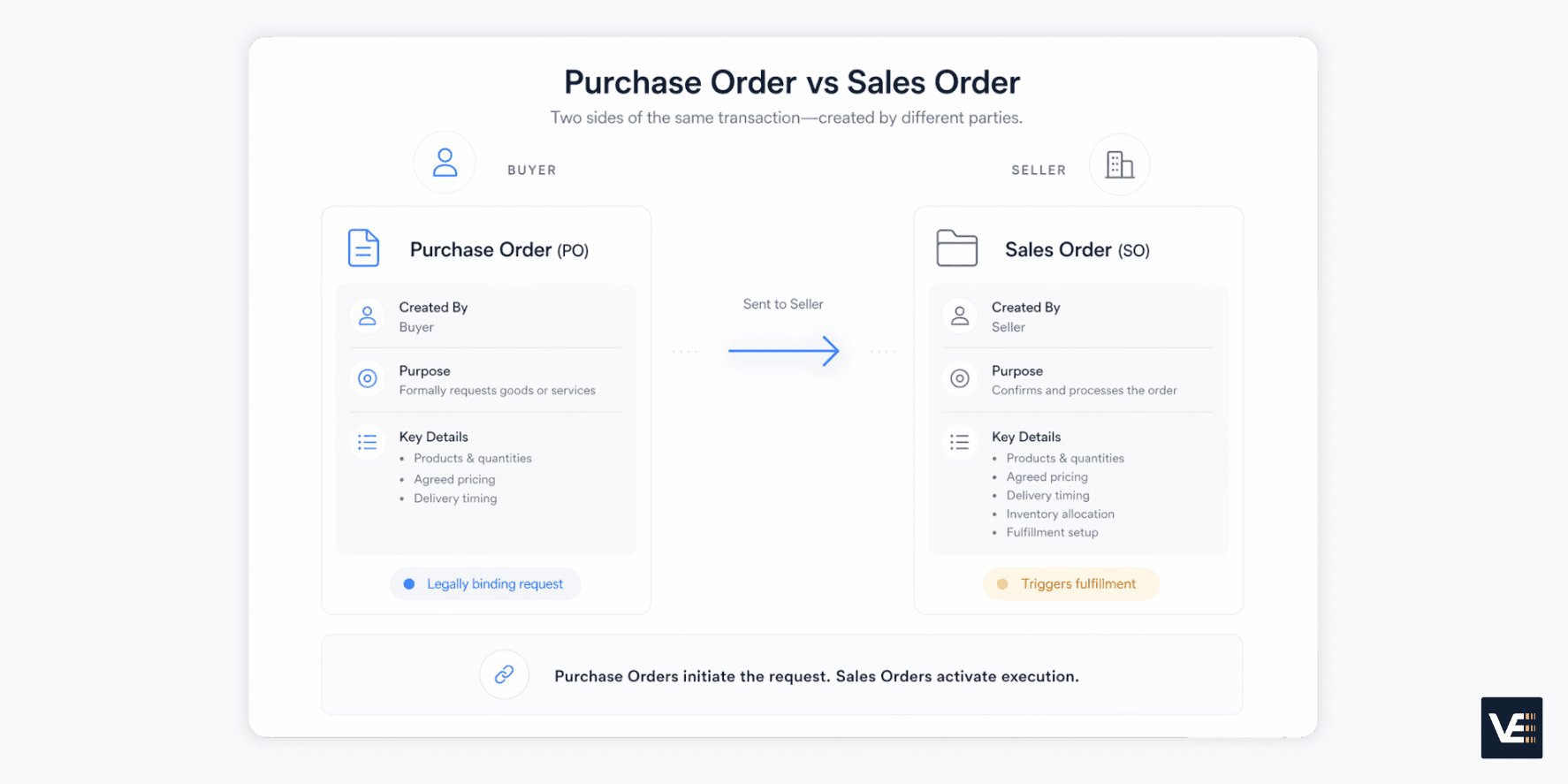
Here’s a practical example: A B2B buyer sends a PO for 200 units of a product at $50 each, with delivery expected by December 1. The seller reviews the PO, confirms stock availability and pricing, and generates a sales order that restates those terms. The PO initiated the transaction; the SO completes the loop and gets the product out the door.
Purchase Order (PO) | Sales Order (SO) | |
|---|---|---|
Created by | Buyer | Seller |
Purpose | Request to purchase | Confirmation to fulfill |
Legally binding? | Yes | Not Typically |
Recipient | Sent to the seller | Internal (seller's team) |
Triggers | Initiates the transaction | Triggers fulfillment |
In short, the PO drives the buyer’s intent. The SO drives the seller’s execution.
Sales Order vs. Invoice
The difference between a sales order and an invoice comes down to timing.
A sales order is created before fulfillment begins. It confirms what will be delivered, how much it costs, and under what terms. It’s the operational blueprint that tells your team what to pick, pack, and ship.
An invoice is issued after the goods or services have been delivered. It’s a financial document requesting payment from the buyer. Invoices include billing-specific details that sales orders typically don’t, such as payment due dates, bank or payment processing information, and any applicable late fees.
There’s also a difference in who uses them. Sales orders are internal documents for the seller’s operations team. Invoices are shared between both parties and serve as official financial records for accounting, tax filing, and audits.
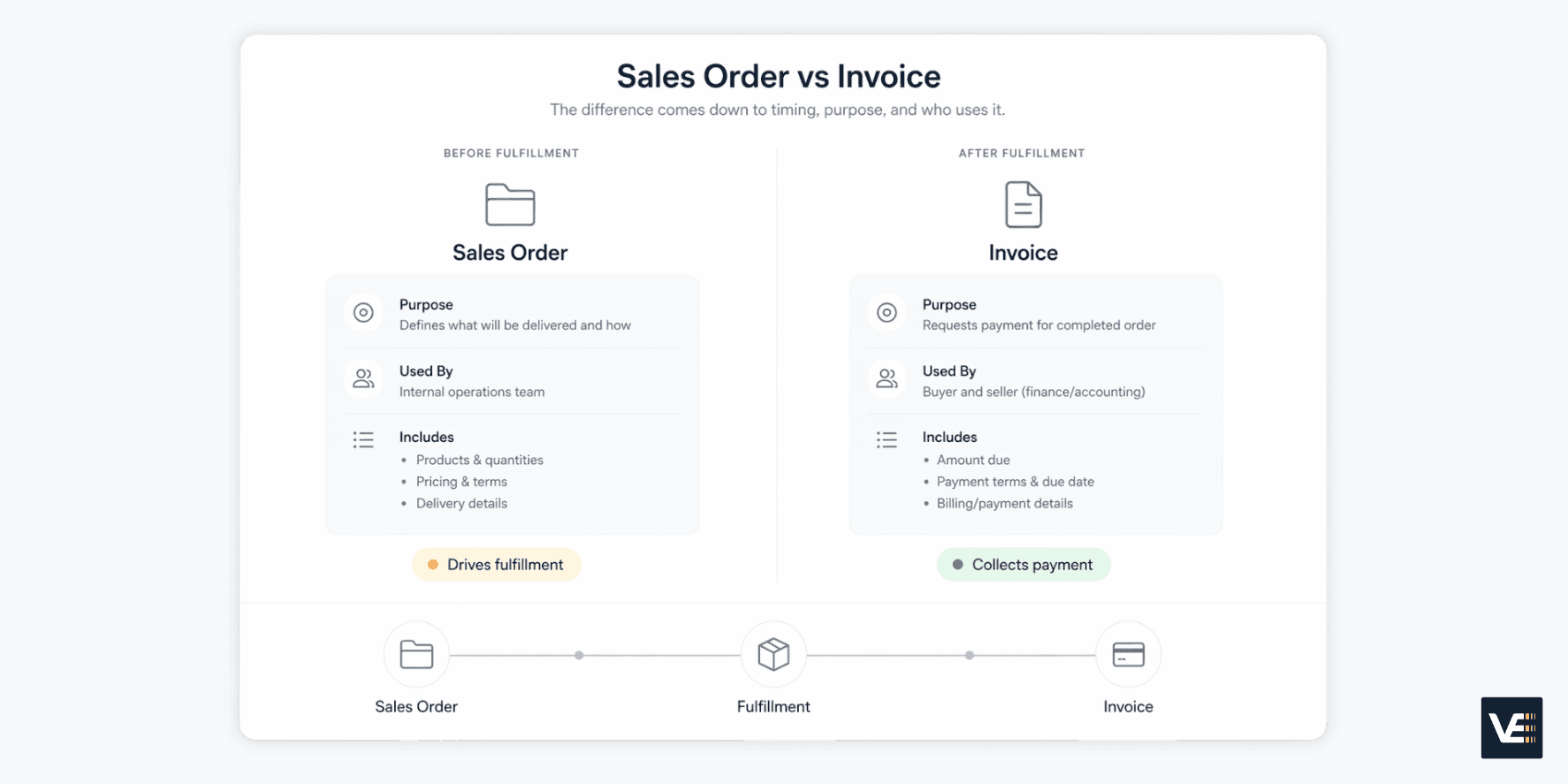
Think of it this way: the sales order is the promise. The invoice is the bill. |
|---|
The Sales Order Process: Step by Step
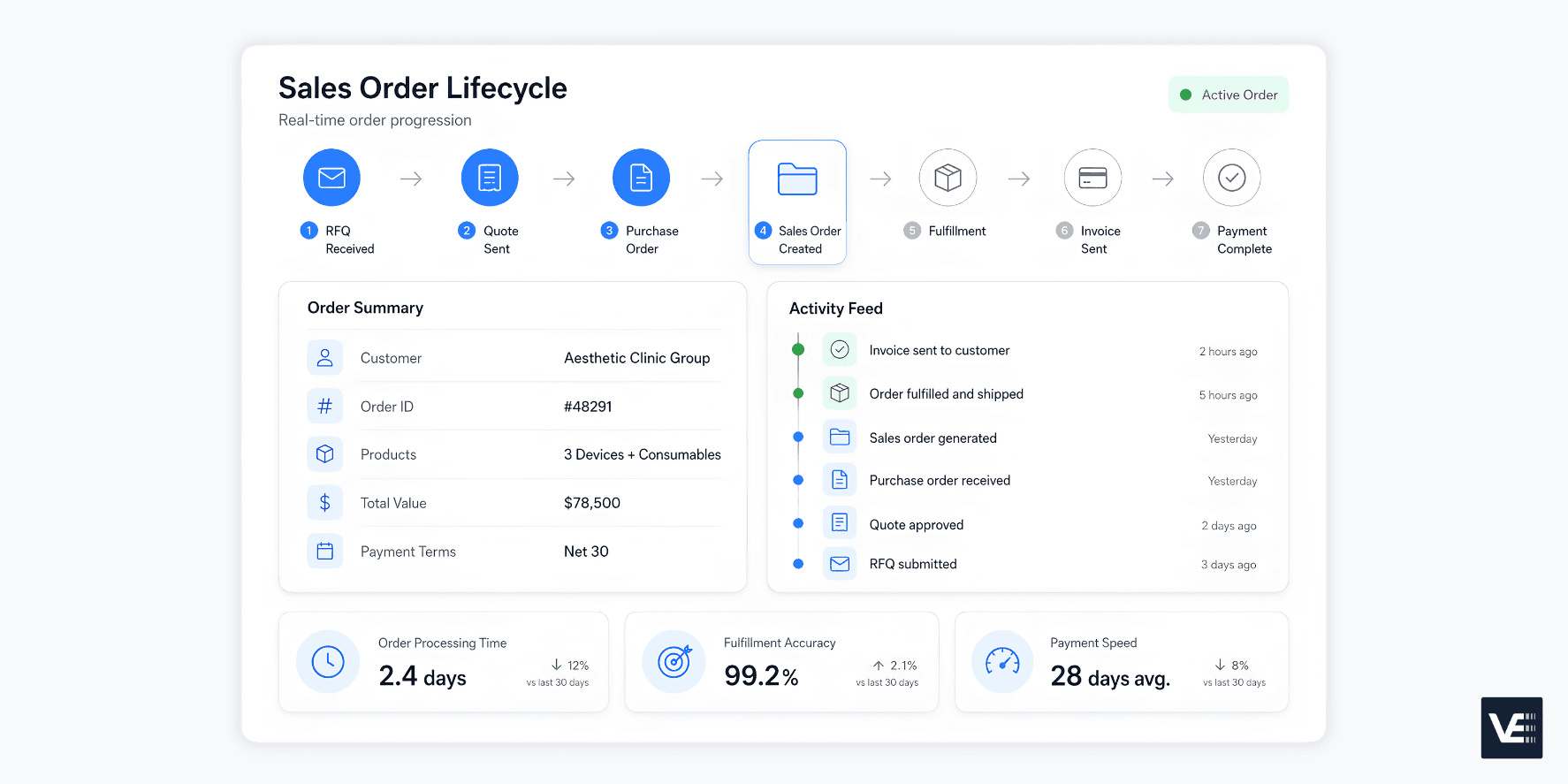
Every sales order follows a predictable lifecycle. Understanding each stage helps identify where bottlenecks form and where automation can make the biggest impact. Here are the seven steps of a typical sales order process:
Step 1: Customer Submits a Request for Quote (RFQ)
The process begins when a prospective buyer reaches out to request pricing. This could come through a sales rep conversation, an online form, or an email. The RFQ specifies what they’re looking to buy, in what quantities, and any special requirements.
Step 2: Seller Responds with a Quote
The sales representative prepares a formal quote that outlines pricing, quantities, delivery timelines, and preliminary terms. At this stage, nothing is binding; the quote is a proposal that can be accepted, negotiated, or declined.
Step 3: Customer Issues a Purchase Order
Once the buyer agrees to the terms, they send a purchase order formally committing to the transaction. The PO locks in the product details, quantities, pricing, discounts (if applicable), and delivery expectations.
Step 4: Seller Creates the Sales Order
This is where the seller takes over. After receiving the PO, the operations team verifies the details: Is the pricing correct? Is inventory available? Does the customer have credit approval (for B2B transactions)? If everything checks out, a sales order is generated to confirm the deal and initiate fulfillment.
Step 5: Order Fulfillment
The warehouse or production team takes it from here. Depending on the business model, this could mean picking and packing products from existing stock, scheduling production for a custom or built-to-order item, or coordinating with a third-party vendor for drop-shipping. The SO is the document that guides every step of this process.
Step 6: Invoice Is Sent
Once the order is delivered, the seller issues an invoice to the buyer requesting payment. The invoice reflects the sales order details and includes payment terms, due dates, and the total amount owed. Consistency between the SO and the invoice is critical; discrepancies lead to disputes and delayed payments.
Step 7: Payment and Closure
The customer pays according to the agreed-upon terms. The seller processes the payment, issues a receipt, and marks the order as complete. At this point, key performance metrics, such as order processing time, fulfillment accuracy, and payment speed, are logged for reporting.
Why this matters: When any of these steps is handled manually or spread across disconnected systems, errors multiply. A pricing mismatch in Step 4 becomes an invoicing dispute in Step 6 and a delayed payment in Step 7. That’s why centralizing and automating the sales order process isn’t a nice-to-have; it’s a revenue imperative. |
|---|
Types of Sales Orders
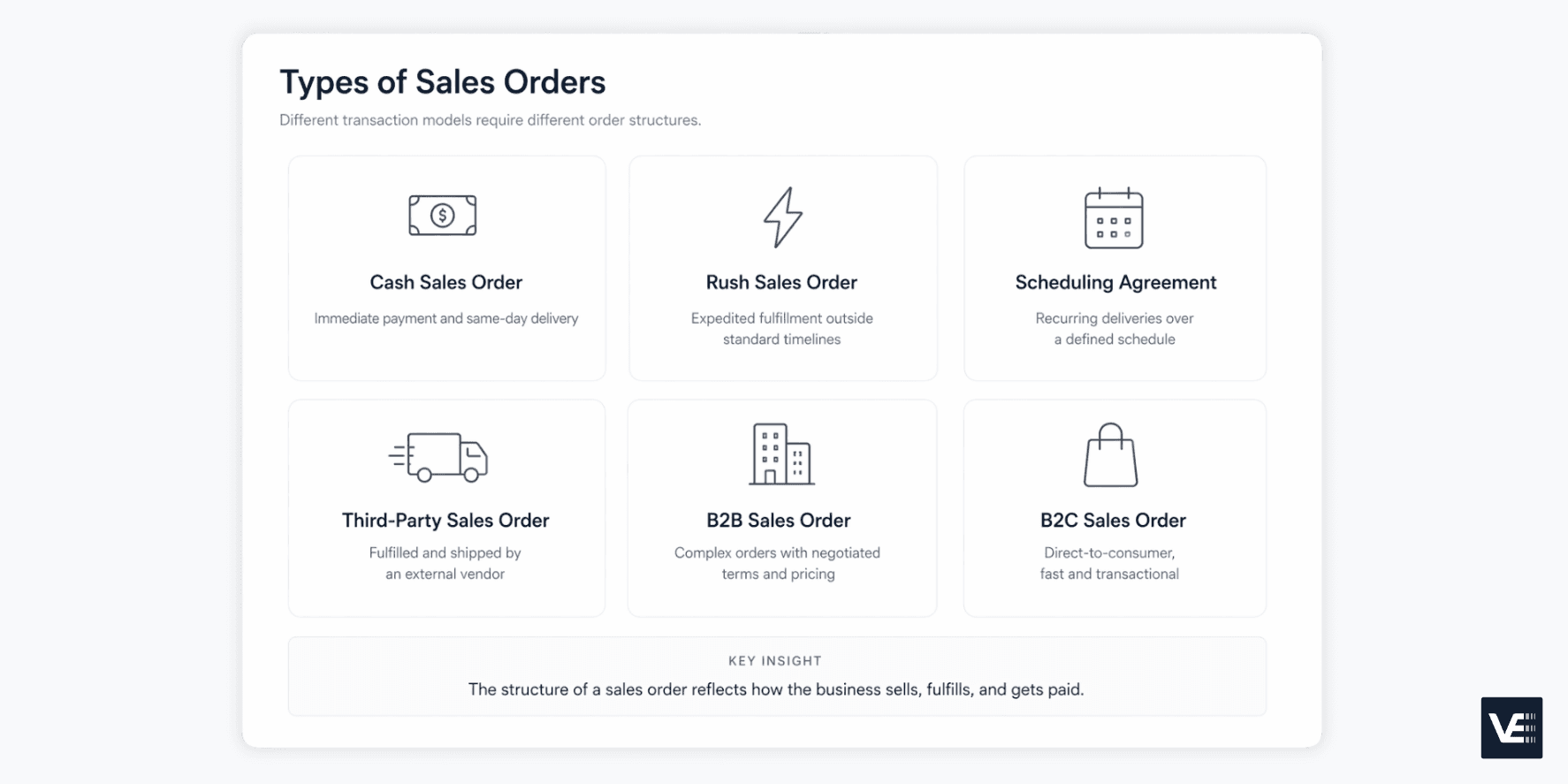
Not all sales orders are created equal. The type you use depends on the transaction model, the customer relationship, and how fulfillment is handled. Here are the most common types:
Cash Sales Order: The simplest type. The customer pays immediately and takes delivery on the spot. There are no accounts receivable involved. Common in retail and point-of-sale transactions.
Rush Sales Order: Used when the customer needs the order faster than the standard lead time. Rush orders are often fulfilled the same day they’re created. The customer typically pays after delivery.
Scheduling Agreement: Designed for complex or recurring orders. This type specifies delivery schedules and exact quantities to be shipped over a defined period. It’s common in manufacturing and supply chain relationships where ongoing replenishment is needed.
Third-Party Sales Order: The seller takes the order, but a third-party vendor handles fulfillment and shipping. This is common for businesses that don’t warehouse their own inventory or use a drop-shipping model.
B2B Sales Order: Created when one business sells to another. These often involve negotiated terms, tiered pricing, volume discounts, and credit approvals. B2B orders are typically more complex and higher-value than consumer transactions.
B2C Sales Order: For direct-to-consumer transactions. These tend to be simpler and driven more by pricing, brand, and convenience than by negotiated contracts.
For businesses managing orders across multiple channels, field sales reps, ecommerce storefronts, and phone orders, dealing with a mix of these types simultaneously is the norm. That’s what makes centralized sales order management so critical.
Benefits of Sales Order Automation
If you’ve read through the seven-step process above and thought, “There are a lot of places where things can go wrong,” you’re right. Manual sales order management is slow, error-prone, and impossible to scale. Automation changes the equation.
Here’s what sales order automation delivers:
Fewer Errors: Automation eliminates manual data entry, which is the single biggest source of pricing mistakes, incorrect quantities, and wrong shipping addresses. When orders flow digitally from placement to fulfillment, the data stays consistent.
Faster Processing: Orders no longer wait in someone’s inbox for manual approval or re-entry into a different system. Automated workflows move orders from capture to fulfillment without handoff delays.
Real-Time Inventory Visibility: When your sales order system is integrated with inventory management, stock levels update in real time. That means no overselling, no unexpected backorders, and no disappointed customers.
Accelerated Order-to-Cash: From the moment a customer places an order to the moment payment clears, automation compresses the cycle. Faster fulfillment leads to faster invoicing, which leads to faster revenue recognition.
Improved Customer Experience: Accurate orders, on-time delivery, and transparent order status updates build trust. When customers know they can rely on your fulfillment, they come back.
Scalability Without Headcount: As order volume grows across channels, automation scales without requiring proportional increases in back-office staff. Companies using platforms like Velocity by MedShift have reported 3–5x revenue growth without adding back-office headcount.
What to Look for in Sales Order Management Software
Knowing you need to automate is one thing. Choosing the right platform is another. Not all sales order management software is built the same, especially for B2B teams with field sales operations, complex commission structures, and multi-channel order flows.
Here’s what to prioritize:
Multi-Channel Order Capture: Your software should consolidate orders from every source, field reps, ecommerce, customer service, into a single platform. If your team is toggling between systems, you’re losing time and accuracy.
CRM and ERP Integration: The platform needs to sync seamlessly with your existing tech stack. Financial systems, inventory management, and CRM data should flow in real time so every team is working from the same numbers.
Territory and Commission Management: For B2B organizations with commissioned sales teams, the platform should automatically assign orders to the correct rep based on territory mapping and calculate commissions without spreadsheets.
Built-In Payment Processing: Virtual payments, vaulted credit cards, ACH, and flexible terms management reduce friction at checkout and accelerate cash collection.
Real-Time Reporting: Leadership needs on-demand visibility into order volume, fulfillment rates, processing speed, and revenue by rep, territory, or product line.
Mobile Access: Field sales reps need to onboard customers and place orders from their phones at the point of sale. If the tool doesn’t work on mobile, it doesn’t work for field teams.
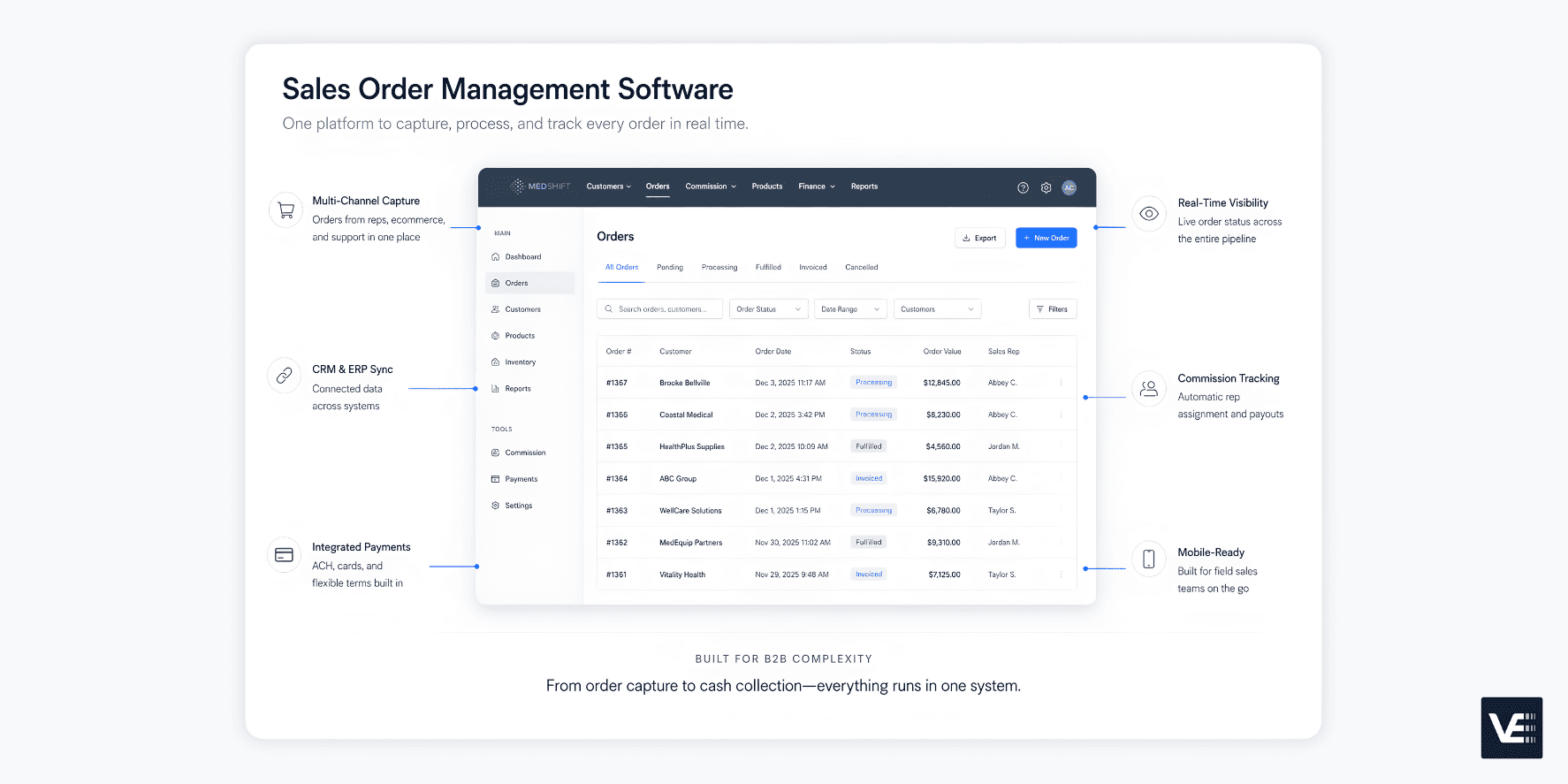
Velocity by MedShift is a B2B sales order management platform built to check every one of these boxes. It unifies multi-channel orders, automates commission calculations across complex sales hierarchies, integrates with Shopify and your existing ERP and financial systems, and gives reps a dedicated mobile app to onboard customers and place orders in minutes.
Serving over 6,000 customers across North America, Velocity is designed for teams that need enterprise-grade order operations without enterprise-grade complexity.
Ready to see it in action? Schedule a Velocity demo or start your 14-day free trial today. |
|---|
FAQs
What does sales order mean?
A sales order is a document created by the seller to confirm and process a customer’s order. It captures every detail of the transaction, product descriptions, quantities, pricing, payment terms, and delivery expectations. It’s primarily an internal document that drives the fulfillment process, ensuring the right products are shipped to the right customer at the right price.
What is the difference between a PO and a sales order?
A purchase order (PO) is created by the buyer and sent to the seller as a formal, legally binding request to purchase specific goods or services. A sales order (SO) is created by the seller in response, confirming they can fulfill the order under the agreed-upon terms. The PO represents the buyer’s commitment to purchase; the SO represents the seller’s commitment to deliver.
What is sales order vs. invoice?
A sales order is created before fulfillment begins. It confirms what will be delivered and under what terms. An invoice is sent after the goods or services have been delivered, requesting payment from the buyer. The sales order outlines the promise; the invoice collects on it.
Who gives the sales order?
The seller (or vendor) creates and issues the sales order. It’s generated internally after a customer commits to a purchase, typically in response to a purchase order from the buyer or after a formal quote has been accepted. In automated systems, the sales order can be generated instantly when an order is placed through ecommerce, a field rep app, or customer service.
Streamline Your Sales Order Process
Sales orders are far more than paperwork. They’re the operational backbone of accurate fulfillment, healthy cash flow, and strong customer relationships. Every time a sales order is processed correctly, it means the right product reaches the right customer at the right time, and revenue flows without friction.
But when sales orders are managed manually, spread across spreadsheets, emails, and disconnected tools, the result is predictable: errors, delays, and lost revenue. And the problem only compounds as order volume grows across multiple channels.
The solution isn’t working harder. It’s working from a single, unified platform that captures every order, automates the workflows behind it, and gives your team real-time visibility from placement to payment.
That’s what Velocity by MedShift was built to do. Whether your orders come from field reps, ecommerce, or customer service, Velocity consolidates everything into one platform, with automated commissions, territory mapping, integrated payments, and a mobile app purpose-built for sales teams in the field.
Ready to eliminate manual order chaos? Schedule a Velocity demo |
|---|