
B2B Customer Portal: Who Should Own It, Your Reps or Your Customers?

Your best customer needs to reorder forty units of the same SKU they've bought every month for three years. Today, that means sending an email to their rep, waiting for a quote, reviewing a confirmation, and maybe even a phone call. That’s four touchpoints for an order that could have taken less than two minutes.
That gap is what a B2B customer portal closes. The question is not whether you need one. It's who should be driving it.
TL;DR: A B2B customer portal is a secure, account-based website where business buyers place orders, view their negotiated pricing, track shipments, pay invoices, and manage users on their own. Whether your sales reps run it or your customers self-serve depends on how complex your deals are, and most sellers end up somewhere in between. |
|---|
INDEX
What is a B2B Customer Portal?
How a B2B Customer Portal Actually Works
The Features That Matter (and the Ones That Don't)
What Sellers Get. What Buyers Get.
B2B customer portal examples
The Real Question: Who Should Own the Portal?
When Your Reps Should Own It
When Your Customers Should Own It
The Hybrid Most B2B Sellers Land On
How to Choose One
FAQs
What is a B2B customer portal?
What is a B2B portal?
What are the best B2B portals in the US?
Who uses a B2B portal?
What is a B2B Customer Portal?
A B2B customer portal is a private, login-protected platform where your business customers can order products, see their contract pricing, check inventory, track orders, manage invoices, and handle their account without calling a rep. Think of it as the self-service hub for a customer relationship that traditionally relied entirely on sales reps and support teams.
It is not the same as a public ecommerce store. A consumer storefront typically shows the same pricing to every visitor and treats each shopper the same way. A B2B portal does the opposite. It knows who is logged in, what they negotiated, what they bought last quarter, and what credit terms they're on. Pricing, catalog, and payment options all shift based on the account.
That account awareness is what makes a B2B customer portal valuable.
How a B2B Customer Portal Actually Works
Buyers see their negotiated pricing, approved product catalog, and complete order history, all within a personalized experience designed to make reordering simple.
Behind the screen, the portal connects to the systems that already run the business. Your ERP feeds real-time inventory and pricing. Your CRM holds the account relationship. Payment and credit logic decides which customers can purchase on terms and which must pay upfront. When an order comes in through the portal, it should flow into the same order management system used for rep-entered and customer service-entered orders, creating a single source of truth across every sales channel.
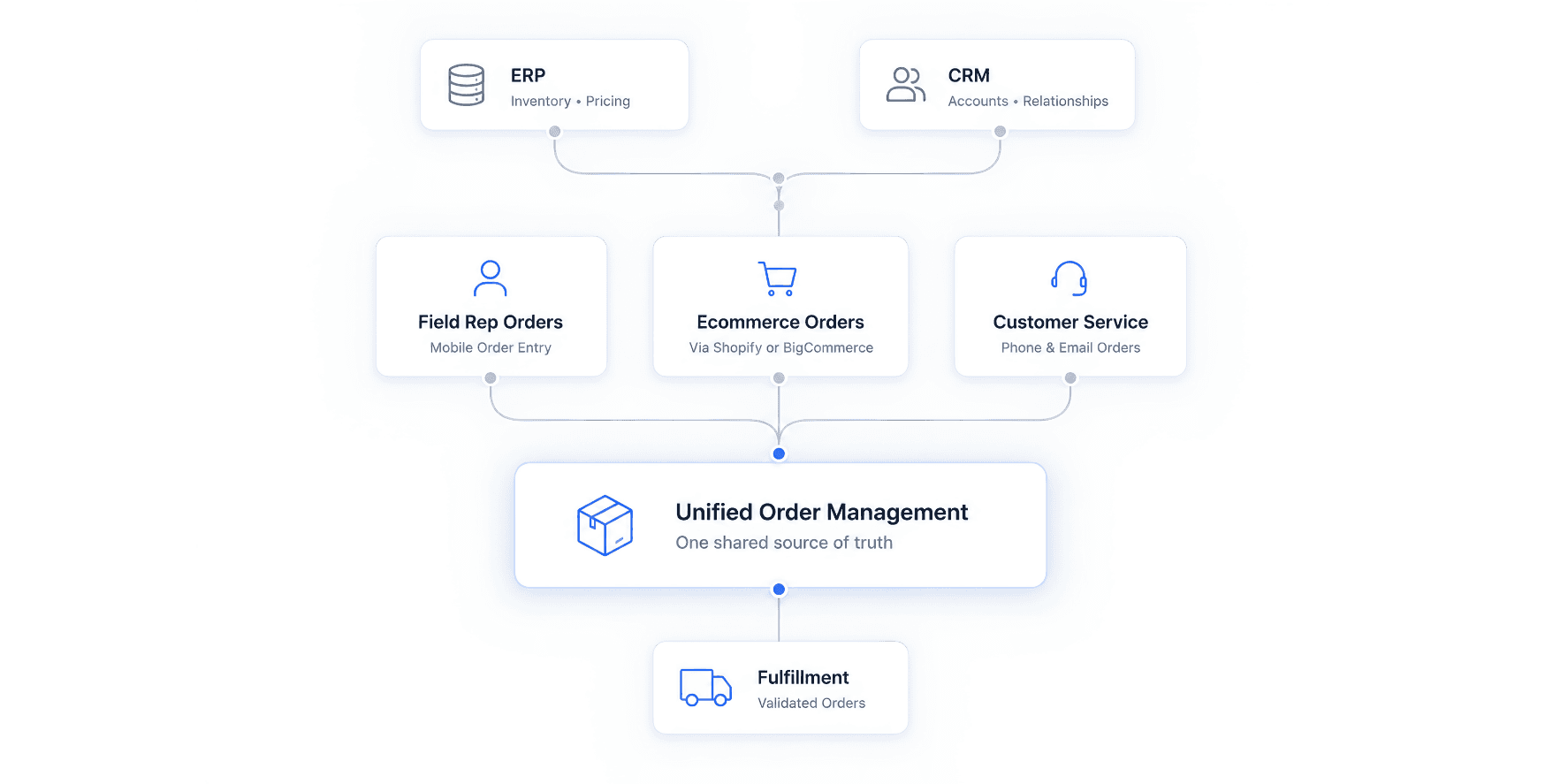
This is where many B2B sellers run into challenges. If rep orders, ecommerce orders, and phone orders all live in separate systems, adding a portal doesn’t solve the problem – it simply creates another place for data to live. The most effective portals sit on top of a centralized order management system, ensuring every order, regardless of channel, follows the same workflow and record structure.
The Features That Matter (and the Ones That Don’t)
Vendors love to list fifty capabilities. Buyers use maybe eight. These are the ones that change behavior:
Account-specific pricing. Contract rates, volume breaks, and customer-specific catalogs show automatically. No "request a quote" wall for prices both sides already agreed on.
Fast reordering from order history, saved lists, and quick-order-by-SKU fields. Repeat buyers live here.
Real-time stock and order tracking, so customers stop emailing "where's my shipment."
Quote requests and approval routing for the deals that still need a human or a manager sign-off.
Invoices, statements, and payment on terms, all in one place.
Role and permission controls. A purchasing manager approves; an assistant drafts; a finance contact only sees billing.
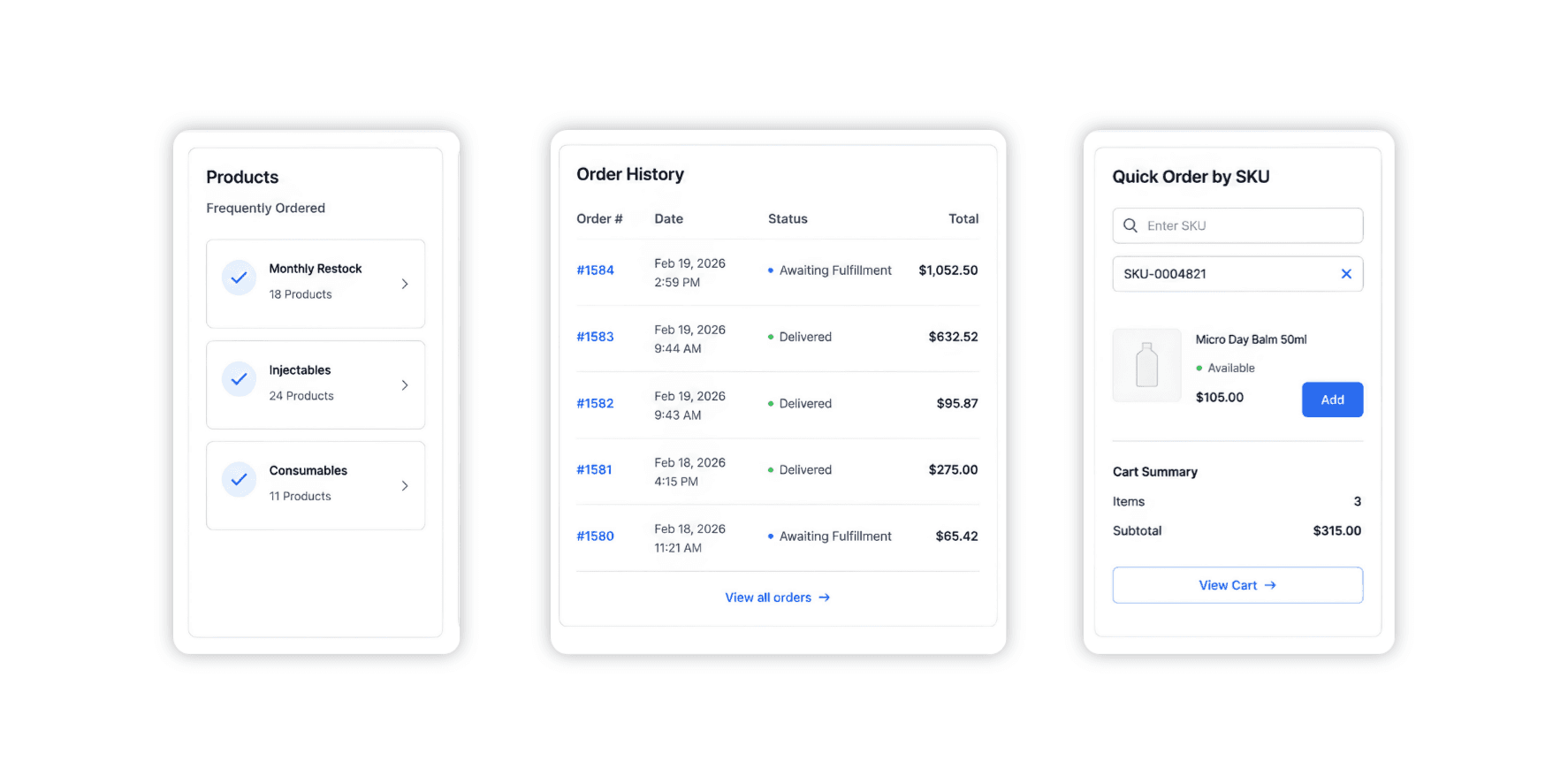
Some features look impressive in a demo but see little adoption after launch. Think AI chat widgets layered onto an underused portal, gamified dashboards, or “social” features. Focus on reducing order friction first. Everything else should support that goal.
What Sellers Get. What Buyers Get.
For the seller, the math is simple. Every self-service order is one less order your sales team has to enter manually. That frees your team to sell instead of taking dictation, cuts order-entry errors, and gives you data on who's buying what, when, and where the drop-offs happen.
For buyers, convenience is the primary benefit. They can order at 11pm without waiting for business hours, see exactly what they paid last time, and skip the phone tag. For a purchasing manager juggling a dozen suppliers, the one with the cleanest portal often wins the repeat business by default.
There's a quieter benefit too. A good portal makes you stickier. Once a customer's order history, saved lists, and team logins live in your system, switching to a competitor means rebuilding all of it. That's retention you didn't have to fight for.
B2B Customer Portal Examples
You'll find portals across nearly every industry that sells to other businesses.
Wholesale and industrial distributors use them for high-frequency reordering of consumables. Manufacturers use them to give dealers and reps a single ordering surface instead of a fax line. Consumer brands that sell B2B run them so retailers and stockists can restock without tying up an account manager. Subscription and SaaS companies use lighter versions for plan changes and billing.
The most interesting use cases involve businesses that sell through multiple channels simultaneously. A rep places an order in the field on Monday, the same customer reorders online on Thursday, and customer service fixes a quantity on Friday. If those three touchpoints don't share a record, you get double-counting, commission fights, and a buyer who sees a different story than your books do. Platforms built for this reality, such as Velocity Commerce, unify field sales, ecommerce, and customer-service orders within a single order management platform, ensuring pricing, commissions, inventory, and customer data stay aligned across every channel.
The pattern across all of them is consistent. The portals that get used are the ones built around how that specific business actually buys, not a generic template with a logo swapped in.
The Real Question: Who Should Own the Portal?
Here's where most "what is a B2B portal" articles stop and where the real decision starts.
A portal can be rep-driven or customer-driven, and the difference shapes everything: your team's workload, your customer experience, even how you pay commissions. Get this wrong, and you either bury your reps in admin or hand a complex sale to a self-service flow that can't carry it.
When your reps should own it
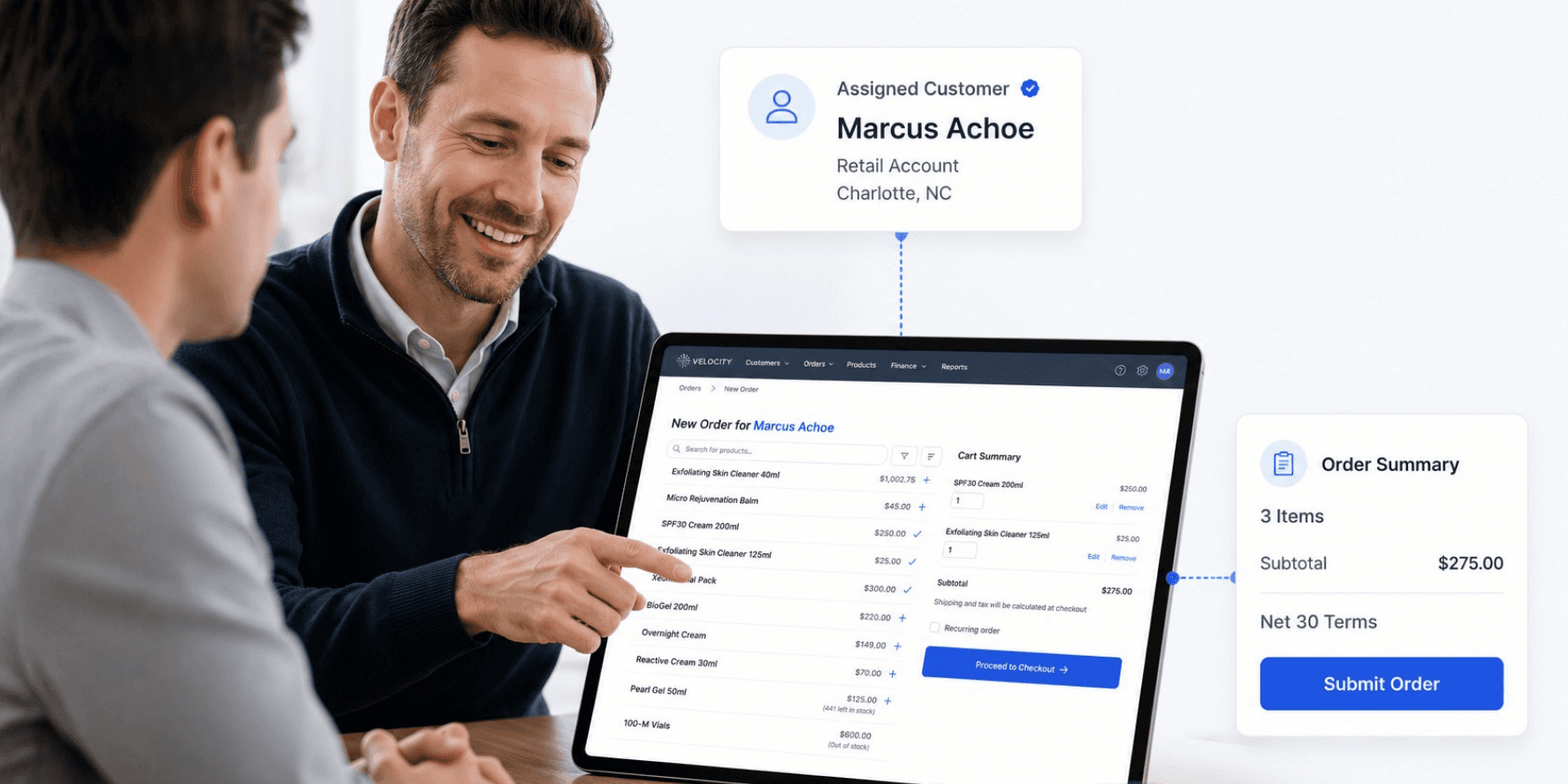
Rep-led ownership works best in complex, consultative, high-value sales environments. If your deals involve configuration, technical guidance, freshly negotiated pricing, or large strategic accounts that expect a human, the rep should stay in the driver's seat. In that model, the portal is a tool the rep works from, on a phone or tablet, building quotes and placing orders with or for the customer. The buyer might get read-only visibility into order status while the rep owns the transaction. This is exactly the type of workflow a mobile sales ordering app is designed to support.
New accounts are another classic case. The first few orders often need hand-holding, a credit setup, and a walkthrough. Push those to self-service too early, and they stall.
When your customers should own it
Customer self-service wins when the buying is repetitive and the product is well understood. Commodity reorders. Standard SKUs at known prices. Buyers who already know exactly what they want and just want it fast. Forcing those orders through a rep wastes everyone's time and caps how much you can grow without hiring more people.
If a customer purchases the same ten items every month, every rep interaction on that order becomes an added cost. Let them self-serve and point your reps at the accounts that actually need them.
The hybrid most B2B sellers land on
Most B2B organizations don’t fit neatly into either model, which is why many adopt a hybrid approach. Reps own the complex, high-touch accounts and the negotiation. Customers self-serve the routine reorders. The same portal supports both, and the smart setups let an order start in self-service and escalate to a rep when it gets complicated.
Dimension | Rep-Led | Customer Self-Service | Hybrid |
|---|---|---|---|
Best for | Complex, negotiated, regulated deals | Repeat orders, standard SKUs | Mixed account base (most sellers) |
Who places the order | The rep | The customer | Either, depending on the order |
Rep workload | High | Low | Focused on accounts that need it |
Scales without headcount? | No | Yes | Mostly |
Main risk | Reps become order-entry clerks | Complex deals fall through the cracks | Unclear rules on what goes where |
The hybrid only works if the boundary is clear. Decide which order types belong to reps and which belong to customers, then build the portal to route accordingly. And tie it back to comp: if reps still earn on self-service orders in their accounts, they'll champion the portal instead of quietly steering customers back to the phone. (More on that in our piece on B2B sales commission management.)
How to Choose One
Skip the feature checklist for a minute and answer the ownership question first. Once you know whether you're rep-led, self-service, or hybrid, the right platform gets obvious fast. From there:
Does it sync cleanly with your ERP and CRM, in real time, both ways?
Can it handle your pricing reality, contracts, tiers, customer-specific catalogs, not just one list price?
Will it support both rep-placed and customer-placed orders in the same system if you need that later?
Is it built for your industry's rules? Regulated sellers, this is non-negotiable.
How fast can a customer actually place a reorder? Count the clicks. That number predicts adoption better than any feature list.
Final Thoughts
A B2B customer portal isn't just a website project. It's a strategic decision about where your sales team adds value and where customers can move faster on their own
Get that part right, and the technology mostly takes care of itself. Reps focus on the relationships and deals that need a human. Customers get the speed they expect. Orders flow through a single system instead of multiple disconnected processes. The result is greater efficiency, better customer experience, and stronger long-term customer retention.
If you sell B2B through a mix of reps, ecommerce, and customer service, that split is the exact problem Velocity Commerce was built around. Schedule a demo to see how it pulls every order channel into one platform, with account pricing, terms, and commissions handled in the same place.
For related reading, see our guide to the best order management system for B2B ecommerce, the five challenges that break B2B operations as you scale, or Taming B2B Chaos for the operational side of all this.
FAQs
What is a B2B customer portal?
A B2B customer portal is a secure, login-based platform where business customers order products, view their negotiated pricing, track shipments, pay invoices, and manage their account online, without going through a sales rep for every transaction. It connects to a company's ERP and CRM so portal orders flow into the same system as rep-entered ones.
What is a B2B portal?
A B2B portal is any private online platform that handles business-to-business transactions or information sharing between a company and its partners, dealers, or customers. A B2B customer portal is one type, focused on the buying relationship. Other variations include vendor portals, supplier portals, and partner portals, each serving a different group.
What are the best B2B portals in the US?
It depends on what you sell and who runs it. General B2B commerce platforms like Salesforce B2B Commerce, OroCommerce, and Shopify-based B2B solutions serve broad needs. Sellers that move orders through several channels at once tend to want something purpose-built: Velocity Commerce, for instance, unifies field-rep, ecommerce, and customer-service ordering against negotiated terms in one system. The "best" one is the one that matches your buying model, not the one with the longest feature list.
Who uses a B2B portal?
Businesses that sell to other businesses, and their customers. On the seller side: manufacturers, wholesalers, distributors, and multi-channel B2B brands. On the buyer side: purchasing managers, procurement teams, dealers, sales reps, and the account staff who place and approve orders.