
B2B Checkout: Net Terms, PO Numbers, and Rep-Approved Carts

Most B2B checkout problems don't look like checkout problems. They surface weeks later as a credit memo, a commission dispute, or two teams reading the same order report differently.
B2B checkout is the point where a negotiated customer relationship turns into a structured record. A consumer checkout collects a card and an address. B2B checkout has to confirm which customer is buying, which pricing applies to them, whether they're inside their credit limit, who authorized the purchase, and which rep owns the resulting order. Each answer becomes data that finance, fulfillment, and sales operations rely on later.
TL;DR: B2B checkout has to resolve four things before accepting an order: who the customer is, what pricing and catalog they see, how payment is authorized, and who owns the order. Net terms, credit limits, PO numbers, and rep-approved carts are the requirements that separate B2B checkout from consumer checkout. Capture each as structured data rather than free text, and the order reaches fulfillment, finance, and commission reporting accurately. |
|---|
INDEX
Why B2B Checkout Works Differently From B2C
The Four Decisions a B2B Checkout Has to Resolve
Net Terms and Credit Limits at Checkout
PO Numbers and Required Fields
Rep-Approved Carts and Rep-Placed Orders
Where B2B Checkout Quietly Breaks Reporting
A B2B Checkout Requirements Checklist
How Velocity Commerce Handles B2B Checkout
Why B2B Checkout Works Differently From B2C
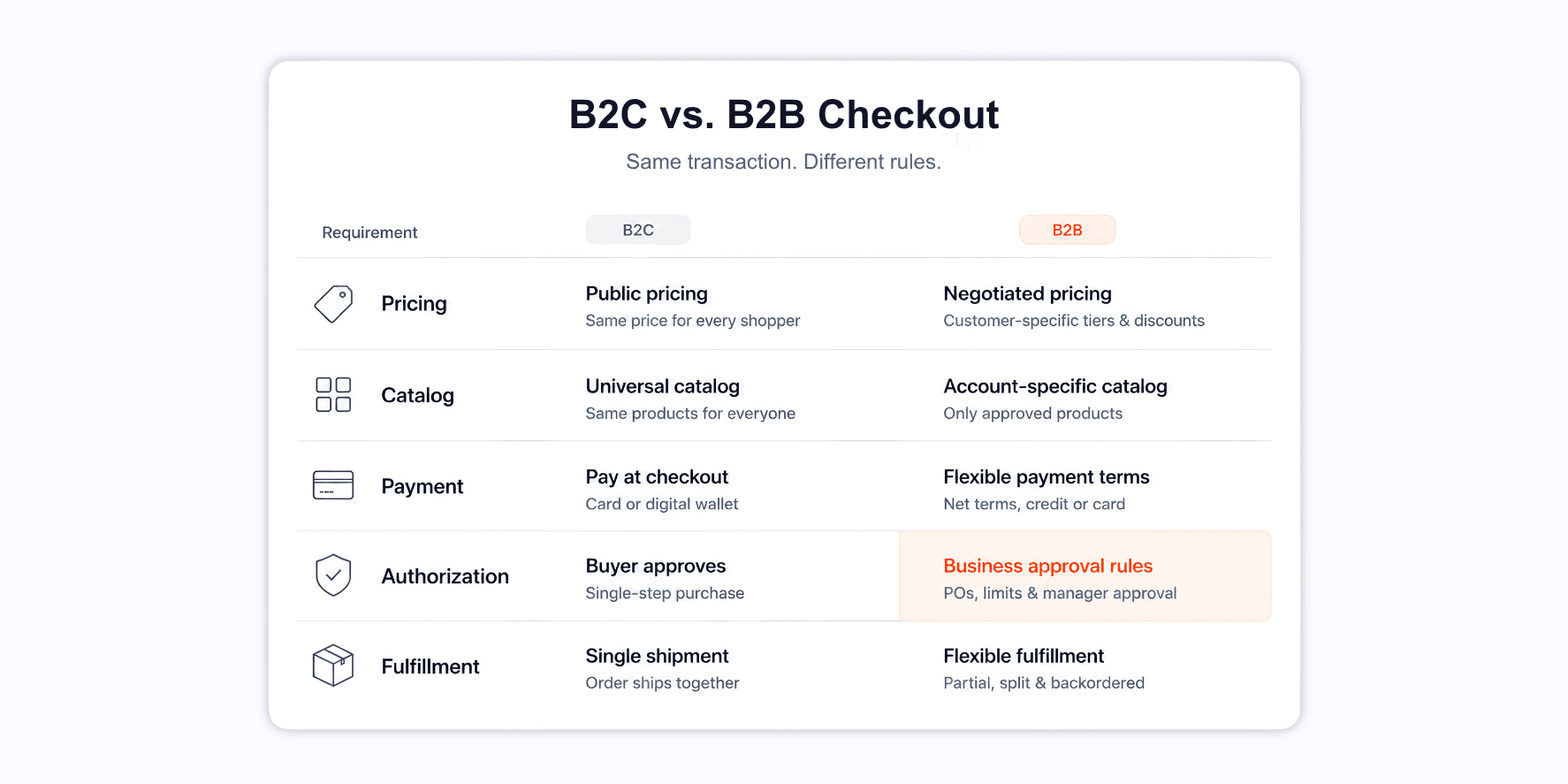
Consumer checkout treats every visitor as the same customer until payment clears. Pricing is public, the catalog is universal, and the transaction closes in a single step. That model breaks when a buyer arrives with negotiated pricing, an approved product list, and a payment agreement signed six months earlier.
In B2B, identity comes first. The buyer signs in, the system recognizes their customer record, and pricing, catalog access, and payment options resolve from that record before anything reaches the cart. A distributor with tier two pricing should never see tier one pricing, and a customer with a restricted catalog should not be able to add products they aren't approved to purchase.
Authorization is also part of the transaction rather than a step that follows it. Business purchases frequently require a purchase order, a spending threshold check, or manager approval from someone other than the buyer. A checkout that ignores this either blocks legitimate orders or accepts orders that finance later has to unwind.
Fulfillment expectations are another key difference. Consumer buyers expect one shipment; business buyers routinely accept partial shipments, backorders, and split delivery dates against a single purchase order. B2B checkout must anticipate these scenarios rather than treat them as exceptions.
The Four Decisions a B2B Checkout Has to Resolve
Before accepting a B2B order, checkout should answer four questions with data rather than assumptions.
Who is buying. Not just the individual placing the order, but the customer record behind them. One purchasing manager may buy for multiple locations with different terms and reps. The order needs to attach to the correct customer entity, because that attachment drives pricing, credit, and attribution.
What they can see and what they pay. Tiered pricing, customer-specific price lists, contract pricing, and catalog restrictions should apply automatically in the cart. If a rep has to correct pricing after submission, the original order record becomes unreliable for reporting.
How payment is authorized. Net terms, credit limits, stored ACH details, and card-on-file all come into play, making this the most involved decision of the four.
Who owns the order. Territory rules and rep assignment determine commission, coverage reporting, and follow-up responsibility. Orders without clear ownership tend to be resolved manually at month-end, which is where commission disputes usually begin.
Net Terms and Credit Limits at Checkout
Payment terms belong to the customer record, not the cart. A customer approved for net 30 should see it as an available option at checkout, without rep intervention or manual entry. When terms live in a spreadsheet that only finance can see, checkout can’t present them, so the order either stalls or gets placed by email.
Credit limits should work the same way. A checkout that knows the customer's credit limit and outstanding balance can make a decision at submission: approve, flag for review, or offer an alternative payment method. Systems that check credit afterward create a slower, more awkward conversation, because the customer already believes the order went through.
Stored payment methods reduce friction when they’re handled properly. ACH details and cards on file should remain in a PCI-compliant vault tied to the customer, available to authorized users across reorders. Storing them in CRM notes or shared documents creates compliance risk and makes reorders depend on whoever happens to be available.
For customers who are over their limit or outside terms, a soft stop works better than a hard failure. Hold the order, notify the rep and credit team, and preserve the cart. The customer keeps their cart, and finance gets a decision point instead of a lost order.
PO Numbers and Required Fields
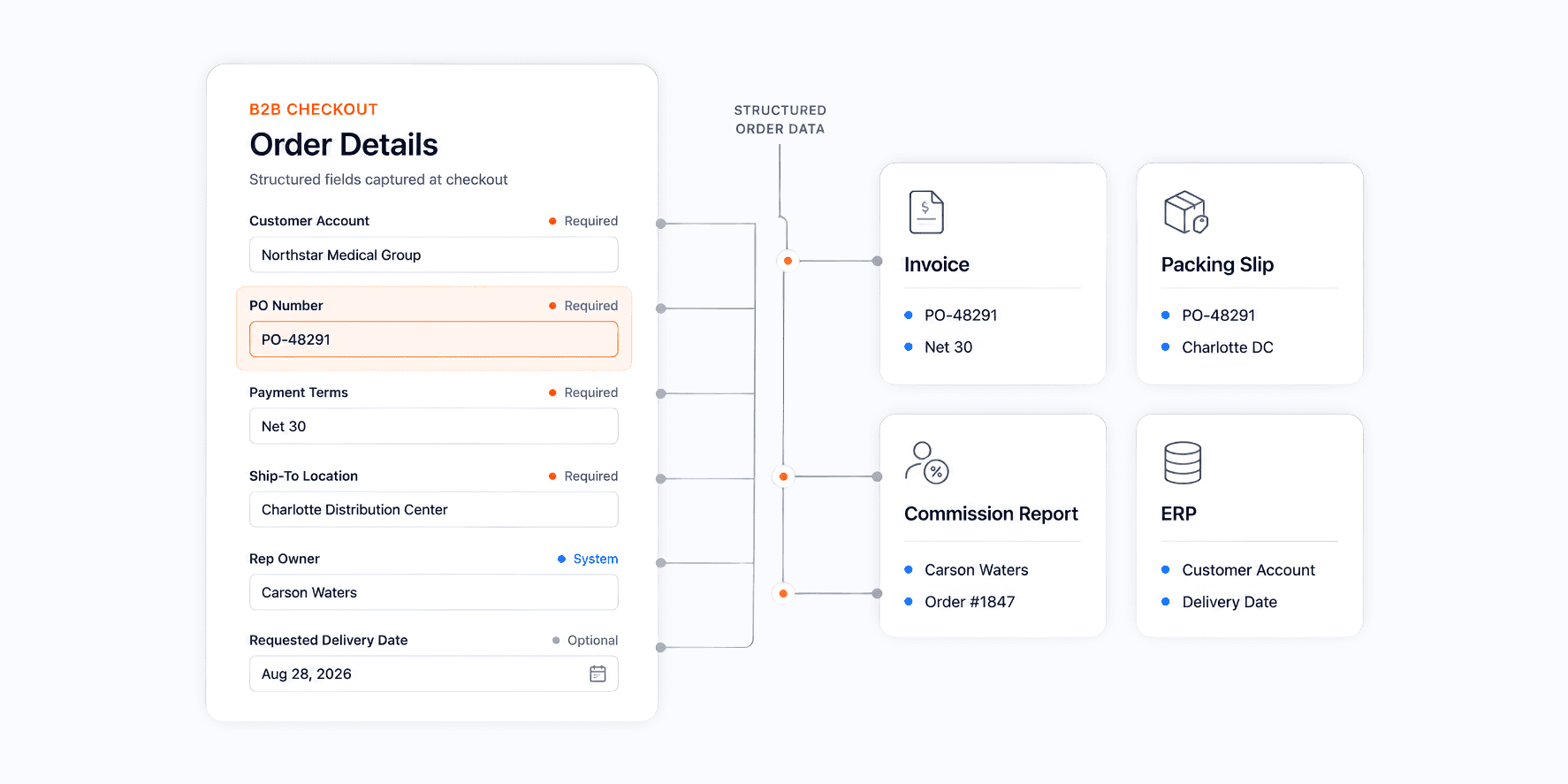
A purchase order number is one of the most commonly required B2B checkout fields and often one of the worst to implement. Many storefronts add it as an optional free-text box in the order notes, so it arrives inconsistently formatted, sometimes missing, and invisible to any systems that need it later.
Treat the PO number as a first-class field with three rules. Make it required for the customers whose procurement process demands it and optional for those who don't use POs. Validate the format when the customer follows a known pattern. Store it in a dedicated field that flows through to the invoice, the packing slip, and the order record.
This matters because of reconciliation. When a customer's accounts payable team receives an invoice, they match it against the purchase order. A missing or mistyped PO number can leave the invoice unpaid until someone chases it, extending days sales outstanding for reasons unrelated to the customer's willingness to pay.
Other fields deserve similar treatment: requested delivery date, ship-to location for multi-site customers, department or cost center codes, and end-customer references for distributors. Each becomes a reporting dimension later, so capturing it as structured data at checkout is far cheaper than reconstructing it from notes. We cover the broader set in our guide to the key fields on a sales order.
Rep-Approved Carts and Rep-Placed Orders
In rep-led B2B sales, the buyer isn't always the one at the keyboard. A field rep may build the cart during a site visit and submit it on the customer's behalf. A customer may build a cart and send it to their rep for review. Both flows are common, but checkout designed only for self-service buyers handles neither well.
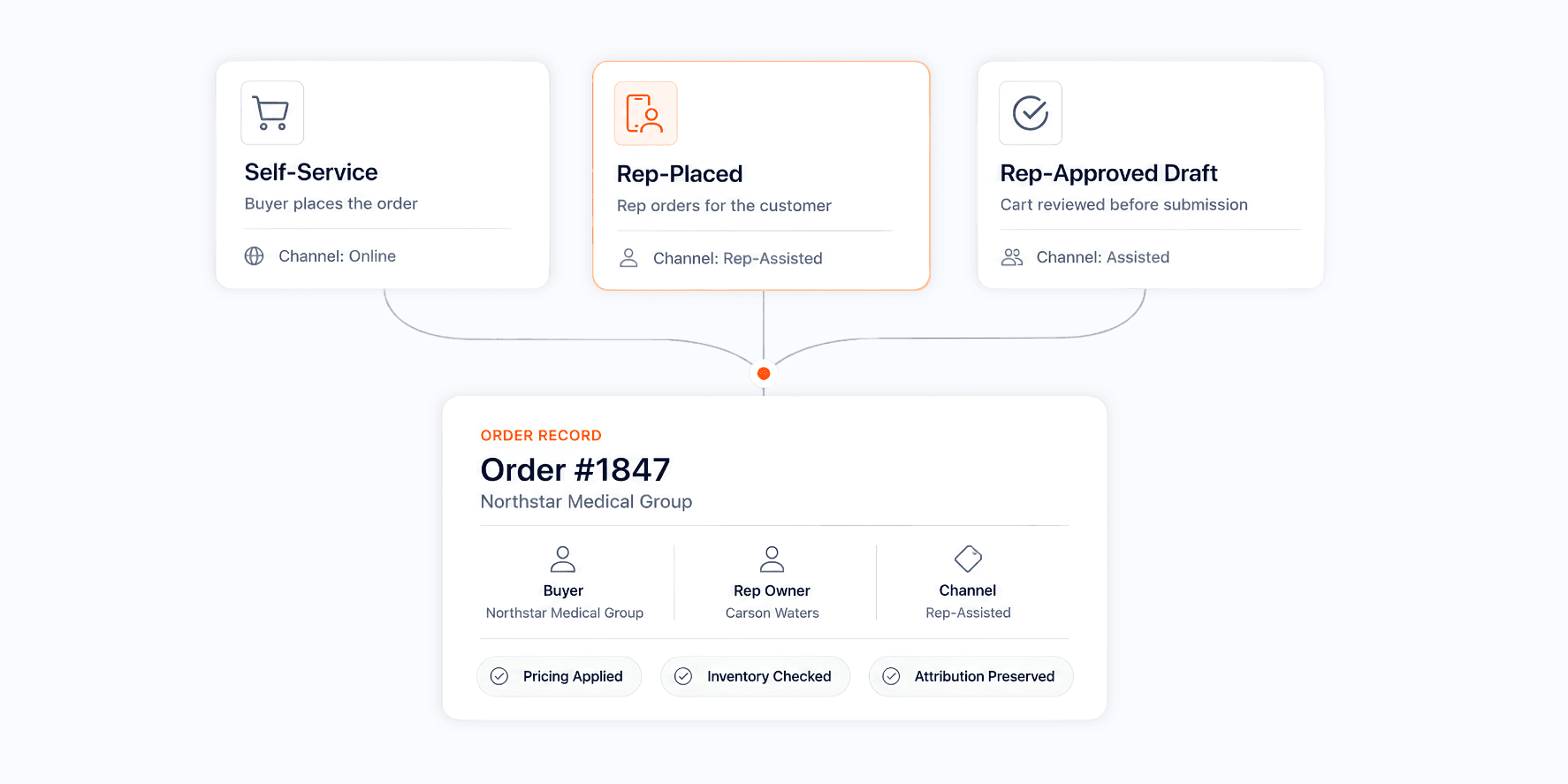
Three workflows cover most rep-led scenarios. The first is the rep-placed order, where the rep orders for a customer through a mobile field sales tool and the order records both parties. The second is a draft cart, where either side builds an order and the other approves it before submission. The third is the approval threshold, where orders above a set value route to a manager before checkout completes.
Each of these needs to preserve attribution. An order placed by a rep on a customer's behalf should still record the customer as the buyer, the rep as the owner, and the channel as rep-assisted rather than online. Collapsing these into one field produces reports where ecommerce appears to grow while rep-driven revenue shrinks, even though the same orders are being counted differently.
Buyers who order independently still need a structured experience. That's the role of the B2B customer portal, which holds reorder history, approved catalogs, and open order status; checkout is the moment inside that portal where the order rules get applied.
Where B2B Checkout Quietly Breaks Reporting
Checkout is usually treated as a conversion problem, but the reporting damage rarely announces itself. Orders go through, customers seem satisfied, and the gaps only become visible at quarter-end when three systems produce three different numbers.
Channel attribution is the first common failure. If rep-placed and self-service orders share the same path with no distinguishing flag, channel reporting becomes guesswork, and coverage decisions rest on numbers nobody can defend.
Inventory commitment is the second. A checkout that accepts orders without checking available stock creates promises the warehouse can't keep and avoidable backorders. The boundary between these systems is mapped out in detail in our post on where B2B inventory management ends and order management begins.
Commission accuracy is the third. Applying territory rules after checkout means ownership can change between submission and payout, and reps notice.
The pattern is the same across all three: a checkout disconnected from downstream systems produces orders that need manual repair. A centralized order management platform closes that loop by making checkout the entry point to a single source of truth, not another place where order data gets created.
A B2B Checkout Requirements Checklist
Use this checklist when you're reviewing a platform or auditing your current setup.
Customer and pricing
Customer-specific pricing and price lists apply automatically at the cart
Catalog visibility respects customer-level restrictions
Multi-location customers can select the correct ship-to and bill-to entities
Minimum order quantities and case pack rules enforced at the line level
Payment
Net terms appear as an option based on the customer's approved terms
Credit limit and outstanding balance checked at submission
Stored ACH and card details held in a PCI-compliant vault
Over-limit orders hold for review instead of failing outright
Authorization and fields
PO number available as a required field per customer, with format validation
Request delivery date, cost center, and end-customer reference captured as structured fields
Approval workflows trigger at configurable thresholds
Rep and attribution
Reps can place orders on behalf of assigned customers
Draft carts can move between rep and customer for approval
Territory rules assign ownership at submission
Channel (self-service, rep-placed, customer service) records on every order
Downstream
Inventory availability checks before the order is accepted
Order data flows to fulfillment, invoicing, and commission reporting without manual re-entry
Partial shipments and backorders remain tied to the original PO
How Velocity Commerce Handles B2B Checkout
Velocity Commerce treats checkout as a data-capture event. Customer records carry their own pricing, catalog access, payment terms, and credit limits, so those rules resolve in the cart instead of being corrected later. Virtual Payments stores ACH details and cards in a PCI-compliant vault tied to the customer, with per-customer terms and limits applied at submission.
Rep-led workflows are native rather than bolted on. Reps place orders for assigned customers through the mobile app, customers order through self-service, and both paths write to the same order record with the channel and owning rep captured. ZIP-level territory rules assign ownership when the order is created, keeping commission calculations consistent with the orders that generated them.
Because Velocity runs as a native Shopify app, a BigCommerce integration, or a standalone platform, the same order rules apply regardless of where the buyer starts. Orders from every channel land in one system, keeping pricing, commissions, inventory, and customer data aligned. Teams running on Shopify can see how this fits together in our overview of a Shopify order management system.
Final Thoughts
B2B checkout is where negotiated terms either get applied or get lost. When customer pricing, payment terms, credit limits, PO numbers, and rep ownership all resolve at submission, the order arrives complete and every downstream system agrees on what happened. When they don't, the repair work moves to finance, sales operations, and whoever reconciles shipment and backorder reporting at month-end.
A practical starting point is an audit. Take the last fifty orders, and check how many required manual corrections to pricing, terms, PO reference, or rep assignment. That number shows how much your checkout is currently costing you.
Velocity Commerce brings order capture, payment terms, territory rules, and commission data into a single platform so orders from reps, ecommerce, and customer service all report the same way. Book a demo to see how it handles your checkout requirements.
FAQs
What is a B2B payment?
A B2B payment is a transaction between two businesses rather than between a business and a consumer. These payments tend to be larger, occur on agreed terms such as net 30 or net 60, and settle through methods such as ACH transfer, wire, corporate card, or invoice against a purchase order. The defining feature is that payment usually happens after delivery rather than at the point of purchase.
Should a PO number be a required field at B2B checkout?
It should be required for the customers whose procurement process depends on it, and optional for those who don't use purchase orders. Making it universally required blocks orders from smaller buyers who have no PO to enter, while making it universally optional means it arrives inconsistently and invoices sit unmatched in the customer's accounts payable queue. The better approach is a per-customer setting with format validation, stored in a dedicated field that carries through to the invoice and the packing slip.
How do net payment terms work in B2B ecommerce?
Net terms let an approved customer receive goods and pay within a set window, commonly 30, 45, or 60 days. In ecommerce, terms are attached to the customer record after a credit review, and the checkout presents them as an available payment option for that customer only. The order generates an invoice rather than an immediate charge, and the outstanding balance counts against the customer's credit limit until it's paid.
What is the best checkout for B2B?
The best B2B checkout is the one that applies your customer-specific rules automatically. At minimum it should support customer pricing and catalogs, net terms with credit limits, required PO numbers, approval workflows, and rep-placed orders, and it should pass all of that data into fulfillment and reporting without re-entry. Platform choice matters less than whether these capabilities are native rather than assembled from plugins.
How do you set up B2B payment terms on Shopify?
Shopify's B2B functionality lets you assign payment terms to a company location, so approved customers see net terms at checkout while others pay immediately. Terms are configured per company rather than per order, and orders placed on terms generate an invoice with a due date. Sellers who also need territory rules, rep commission tracking, and rep-placed ordering typically pair this with a dedicated order management layer.
What is the difference between a B2B checkout and a B2B customer portal?
A B2B customer portal is the logged-in environment where buyers browse their approved catalog, review order history, and start reorders. Checkout is the step inside that experience where order rules get applied and the order is accepted. The portal determines what the customer can do; the checkout determines what the resulting order record contains.